Health Connect
Health Connect is Android's unified platform for health and fitness data. As of pull request #5346, Gadgetbridge can sync your device data to Health Connect, making it available to other health and fitness apps that support the platform.
From a privacy standpoint, all data stored in Health Connect stays inside the device, no data is sent to external servers (even to Google) through this integration. Applications must be explicitly permitted to access data stored in Health Connect, and given permissions can be revoked at any time through Android settings.
Usage of non-free (as-in freedom) software ahead
Health Connect is a component integrated to AOSP (Android Open Source Project), so it is a part of Android since Android 14 and later, therefore no any proprietary application is required to have Health Connect feature on your device if you use these versions of Android.
However, for earlier versions of Android (13 and below), since it wasn't a part of Android at that time, to have Health Connect feature on your system, you do need to install "Health Connect" application from Google Play Store which is proprietary.
Supported data types
Gadgetbridge can sync the following data types to Health Connect:
- Steps
- Heart Rate
- Blood Oxygen Saturation (SpO₂)
- Blood Glucose
- Heart Rate Variability (HRV)
- Body / Skin Temperature
- Respiratory rate
- Resting heart rate
- Sleep Sessions
- Weight
- VO₂ Max
- Exercise Sessions, as well as the following details:
- Steps
- Cadence (steps / pedaling)
- Distance
- Elevation Gained
- Exercise Route
- Power
- Speed
- Active Calories
- Total Calories Burned
Setting up
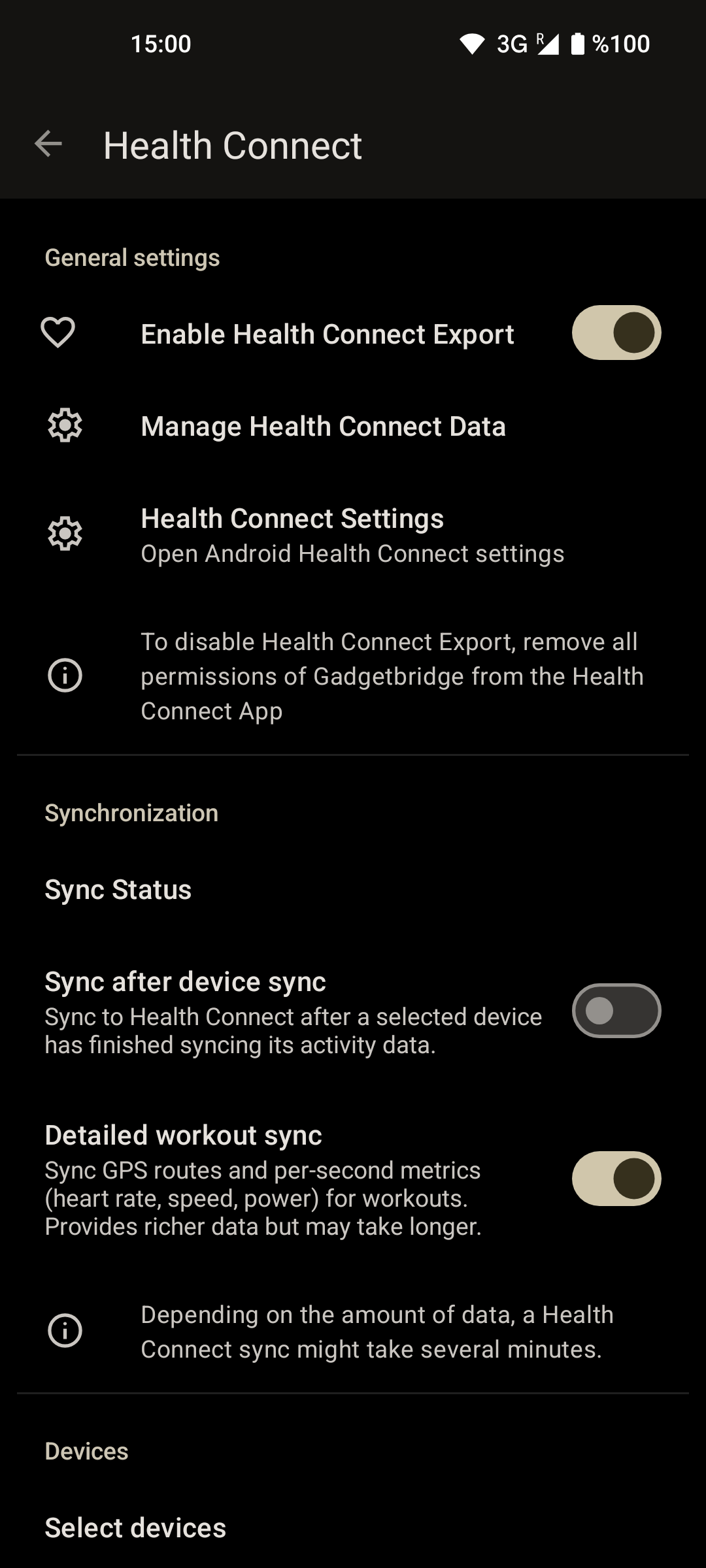
In Gadgetbridge, go to " Settings → External Integrations → Health Connect".
Then, enable Health Connect sync and grant the permissions for the data types you want to sync. On first use, you will be able to configure the initial sync, controlling how much historical data to sync.
To configure your sync preferences:
- Enable Sync after device sync to automatically sync data after your device syncs with Gadgetbridge
- Enable Detailed workout sync to include per-second data from workouts (takes longer to sync)
Initial sync
When you first enable Health Connect sync, you can choose how much historical data to sync:
- Sync all available data from your device
- Limit sync to a specific time period (e.g., last 7 days, 30 days, etc.)
Note that syncing large amounts of historical data may take some time and could trigger rate limits. The sync will automatically retry if rate limits are encountered.