Gadgetbridge 2026.11.0: A refreshed design, new devices, and quick controls
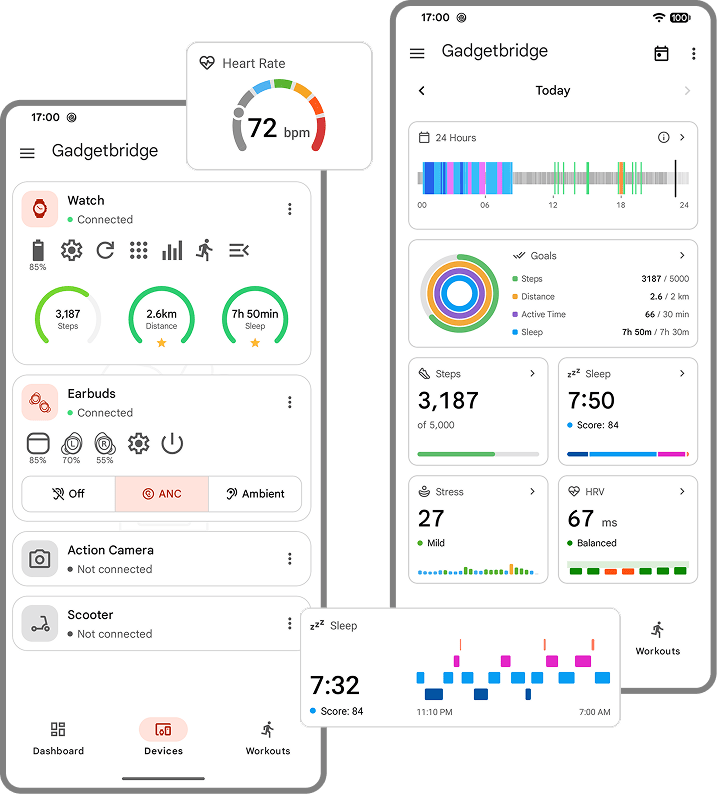
This release brings a refreshed design across the dashboard, charts, and many other screens. Dashboard widgets can now be added to the Android launcher. Device cards can now have quick controls, and configurable items. The main screen now includes a new workouts tab. The release also brings initial support for 40 new devices.
To celebrate such a big release, we have also implemented a change that is both small and big: we switched from 0.x versions to calendar-based versions. Releases will from now on include the year and month, and a patch level for bugfix releases within that month.
The new versioning scheme (called CalVer - calendar versioning) gives users immediate understanding of the age of a release, and it makes releases more recognizable in support tickets. Note that the new scheme doesn't mean we are introducing a release schedule. We will not start releasing every month or only at the start of the month. Releases will keep happening only when the core team feels everything is stable and ready for prime time.
New Devices
This release adds initial support for these devices:
- Anker Soundcore Motion+, R50i NC, V20i
- Bettdow FB051 (MoYoung / Da Fit)
- Beurer BM59
- BRAZ/7HARRY (FitPro)
- Casio GG-B100
- Colmi P10
- Fire-Boltt 069, KW19-B, Ninja Phantom (MoYoung / Da Fit)
- GE Fit Plus (QN-Scale)
- HiFuture Zone 2 (GloryFit)
- Huawei Watch 6 / 6 Pro / D3
- iGPSPORT BSC 100Max
- Innovo iP900BP-B pulse oximeter
- Some other iTag versions
- T70 (GloryFit)
- Teufel Mynd
- Xiaomi Smart Band 11, Smart Band 11 Active, Watch S5
- Yawell Y27 AI Health WatchPad
- Zeblaze Stratos 4 Pro
Experimental support:
- Anker Soundcore Space One, and 15 other Anker Soundcore devices
- Concept2 PM5
- Coros Pace 3
- Garmin Quatix 7 / 7X
- Segway Ninebot F2 Pro KickScooter
Refreshed Design
These screens have a new refreshed design:
- Alarms list and details
- App manager
- Charts
- Dashboard
- Device discovery list
- Permissions screen
- Splash screen
- Test device dialog
- World clocks
- Contacts
- Widgets
Some old dialogs were also moved to Material 3, and there are new and refreshed activity icons.
Dashboard and Charts
The dashboard has been fully rewritten, now allowing for widgets to be dragged and dropped in a grid, and for a much larger variety of widgets. Each widget provides multiple variants, with different layouts and sizes.
The dashboard layout is also independent between screen sizes, allowing for an improved configuration in foldable phones.
Dashboard widgets can also be individually added to the phone's launcher.
Charts
The charts have a new optional overview page.
All charts were migrated to an unified internal model, which brings consistency across all charts, as well as a slightly refreshed design. The popup when clicking data on the charts has also been improved.
Device Cards
You can now configure and hide the items showed in the device cards, as well as quick controls for gadgets that support them (Oppo, Shokz, Sinilink and Sony devices, for now).
Device discovery
Device discovery has also seen a refreshed flow:
A new details screen allows for device information to be obtained directly within Gadgetbridge, without using external Bluetooth scanning tools.
Pairing a new device now displays a step-by-step flow, which only finishes when the device was correctly initialized, instead of dropping to an empty devices screen.
Workouts
The main screen now has a new workouts tab, which shows workouts across all devices. The workouts screen also has a new statistics overview, which allows for workout statistics to be charted to spot trends.
It is now possible to select more than 2 charts for overlay in the workout details. There is also a new heart rate zones overlay on the heart rate chart.
Altitude correction
Gadgetbridge can now correct track altitudes from SRTM tiles, for devices that do not have a barometer / do not provide an accurate altitude value.
Garmin
Gadgetbridge now supports custom apps for navigation and loyalty cards.
It is also possible to import the data from the official app, when migrating to Gadgetbridge.
Sleep sync has also been improved for older watches - Gadgetbridge now estimates sleep from movement and heart rate data.
Other Devices
- Amazfit Bip: Experimental sleep estimation.
- Anker Soundcore: Multiple improvements across all Anker Soundcore devices.
- Cycling sensor: Record and display cadence, and resets live values when the sensor goes silent.
- DJI Osmo Action 4: The camera gallery is available over Wi-Fi.
- H59: Notifications and incoming calls are now supported.
- Huami: Enable SpO₂, stress and PAI for devices. Fixed accelerometer parsing.
- Huawei: Sleep breath feature is now enabled.
- Oppo headphones: ANC level is now supported.
- Pebble: Select which app store to use, start apps and watchfaces from the app manager, and see updates in a new tab.
- Polar H9/H10: Live data is now available.
- Xiaomi-protobuf: Setttings for irregular heart rhythm alert and the sleep breathing rate. Improved activity sync and GPS support.
Notifications
The configuration of app notifications has been reworked to allow for more intuitive and flexible configuration. It is now possible to configure regular expressions for filters and replacements, as well as override certain global settings per-app (message privacy, send when screen on, forward local-only notifications, etc).
This release also deprecates the SMS Receiver, forwarding SMS directly from the app notifications.
There are also new transliterators for Khmer and Thai.
Health Connect
Activities deleted from Gadgetbridge are now also deleted from Health Connect. Workout strength sets are exported as exercise segments. Total calories are written to Health Connect.
Other Improvements
The entire list of changes and fixes can be found in the CHANGELOG file in our repository.
Get It Now
You can get the latest release from F-Droid, IzzyOnDroid and on our releases page.
If you install Gadgetbridge directly from our releases page you will need to track updates manually! To be sure that you're running an updated version we recommend the use of an app repository like F-Droid or IzzyOnDroid. Another alternative is to use Obtainium to download and update directly from Codeberg.
Thanks to our community and contributors for keeping Gadgetbridge growing!
The Gadgetbridge Team